I am excited about technology – about what it can do – about its inherent creative possibilities. It has a caché not dissimilar to that of Las Vegas. It is glitzy and glamorous, promises infinite rewards that, most of the time, refuse to pan out. This sounds negative, but it’s not meant to be. If Las Vegas were bad, people would stop going back. Right?
That said, melding technology with good teaching, at times feels a little bit like winning at craps. (Of course, if you don’t win, you can always drink.)
Just recently, I decided to experiment with Etherpad and Wix.com. This experiment was facilitated by a kind teacher who was willing to have me in his classroom messing up lesson plans that potentially would have run more smoothly without my interference. The benefit for this teacher was that, as teacher-librarian, I had time to find and create resources (and web sites) that, hopefully, would make the students’ experience of the novel richer. Our goal was to provide students with some background to the Russian Revolution (before reading Animal Farm) through the various links provided in the web site. The students, then, would have the opportunity to collect their learnings on a group Etherpad. Their writings on the Etherpad would serve as preliminary notes/background for the novel.
I congratulated myself on my brilliance and off we went to the library to learn.
After an inspiring explanation of how Etherpad works, the students responded with blank, unimpressed looks akin to what you might find on someone who has just been hit in the head with a large pumpkin.
The conversations went something like this . . .
“So basically you want me to use this Etherpad thing to communicate with the person who is sitting right beside me?”
“Well, yes, but they could be anywhere. Think of the possibilities . . .”
“But they’re right beside me. I could just talk to them.”
“Well, yes, but you can also pose questions that your teachers can answer at some point . . .”
“But you’re standing right there . . .”
It was a bit like “The Emperor’s New Clothes.” It didn’t matter how much I tried to convince the students that this technology had potential. They knew that I was standing in the library naked.
But my learning was not complete. There was more to learn (and clearly it was I who learned the most on this particular occasion). This is what I learned . . .
• Students need to be told to use their real names when doing school activities using technology. As unbelievable as it may seem, it is not that easy to identify “Brown-Ice,” “Tasmanian Devil,” “SexyMiss16.”
• Students also need to be told that using the chat function on Etherpad to tell other students to “F-Off” is probably not appropriate for school.
• New technologies are a little bit like Las Vegas showgirls – it’s easy to be distracted by the glitter and forget that it’s, like, really hard to be a Las Vegas showgirl.
• While students may be “Digital Natives,” in some ways they are just as illiterate, primitive and barbaric as we “Digital Immigrants” (not to mention the lesser known “Digital WTF Are You Talking About?”)
The experience, overall, was a bit like getting married by an Elvis Impersonator after drinking a fifth of gin – not great, but not that bad either. And definitely worth trying again, once you get the first marriage annulled.
The experience with the students, Etherpad, Animal Farm and wix.com, not to mention a generous and patient collaborating teacher, simply underlined that learning is messy (leaves bits of feathers and sequins everywhere), and often things do not go as planned. That said, we’re not done. Next time the lesson will be better. I think it’s what keeps people coming back to Vegas – sometimes you win.
Wednesday, March 17, 2010

Learner Lois Keller
Literacy for the 21th Century... what does it mean in our collegiates? What does it mean to students? What does it mean to teachers?
My roles in working with Collegiate Renewal as a learning leader, resource teacher, support literacy coach with READ teachers and a mother of adolescents has lead me to numerous questions around how we are meeting the needs and inspiring the potential of our students. The changes in popular culture, and technology present an urgency and opportunity to creatively and collaboratively respond if we are going to support all our learners. I am a digital immigrant... one who breaks into hives when I am responsible for using technology, and yet I see incredible possibility for all of us to meet the learning needs and collaborative and communication possibilities.
A year ago to the day, appropriately on St. Patrick's Day, we gathered as a group of READ teachers committed to the literacy of adolescents and we began a journey investigating how Web 2.0 tools would best assist our students in capturing their ideas and support their literacy needs. We worked toward developing school based teams: READ teacher, teacher librarians, EAL teachers, and resource support teachers. It was our beginning point with technology, and now a year later, many of those individuals who were just beginning to imagine the possibility returned to lead the conversation and share their experiences.
My roles in working with Collegiate Renewal as a learning leader, resource teacher, support literacy coach with READ teachers and a mother of adolescents has lead me to numerous questions around how we are meeting the needs and inspiring the potential of our students. The changes in popular culture, and technology present an urgency and opportunity to creatively and collaboratively respond if we are going to support all our learners. I am a digital immigrant... one who breaks into hives when I am responsible for using technology, and yet I see incredible possibility for all of us to meet the learning needs and collaborative and communication possibilities.
A year ago to the day, appropriately on St. Patrick's Day, we gathered as a group of READ teachers committed to the literacy of adolescents and we began a journey investigating how Web 2.0 tools would best assist our students in capturing their ideas and support their literacy needs. We worked toward developing school based teams: READ teacher, teacher librarians, EAL teachers, and resource support teachers. It was our beginning point with technology, and now a year later, many of those individuals who were just beginning to imagine the possibility returned to lead the conversation and share their experiences.
Overview - 21st Century Learning Day
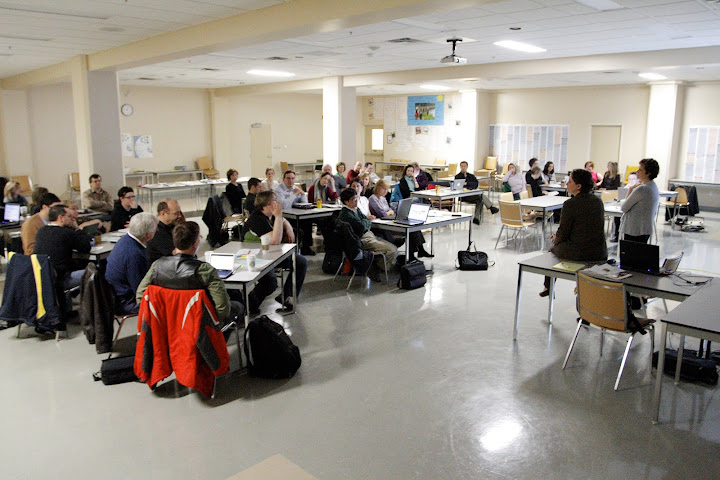
Yesterday, a little over 40 educators in Saskatoon Public Schools got together to share what they had been learning about technology. Today, a group of us are getting together to reflect on the day and future steps. Our inquiry will revolve around what teachers need in order to be supported in using technology to grow student learning and literacy.
Who will you hear from?
- Arlene Fedorchuk, EAL/ESL teacher
- Wendy James, Educational Technologist,who writes this blog
- Lois Keller, Learning Leader, Lead Literacy Teacher
- Sandra Mancusi, Spanish/EAL teacher
- Scott St. Pierre, Secondary Instructional Technology Leader (see his site)
- Jay Salikin, Educational Technology Analyst
- Shannon Welch, Teacher Librarian
Throughout the course of the day, we will each be publishing materials on-line that will include our reflections about our learning in during our PD yesterday, and our thoughts about the supports need to make our technology use in secondary classrooms meaningful. I will keep modifying this post so it is an index of all our posting.
Pre-day thoughts
- Wendy James on why blogging is scary
- Wendy James on worries about this type of PD day
- Wendy James on the structure of the day
During the day
- See photos from the day
- Wendy James on the opening session
- Read Dave Derksen's reflections as a person who thinks about improving the structures of professional learning opportunities.
- Wendy James on acting as a Google Jockey in one session
- Arlene Fedorchuk thinks about the impact of the day
- Wendy James on Audio comments
- Lois Keller on Inquiry
- Wendy James on the session on tools for language learners
- Wendy James on integrated classes
- Feedback on the day and Wendy's reflections
- Sandra Mancusi's glog
Literacy: It's not just about reading anymore
I was fortunate to attend an in-service on Literacy in the 21st Century. What made this professional development session different was the audience. The focus was on use of technology, which often means the audience will be individuals with an interest or expertise in technology. Yesterday, half of the audience comprised of language specialists, many of whom also presented.
With four concurrent sessions over three time periods, there were plenty of options for the participants to chose from. It was great to see the use of technology integrated into various areas of instruction.
One of my personal areas of interest are the use of Virtual Classrooms, a piece of our school system's portal. A VC can be used in a variety ways, from web-enhancing a classroom by posting notes, assignments and a calendar of events or to providing online forums for students to post work, provide feedback, work collaboratively, and support each other. It was great to see such a variety of areas leveraging this piece of technology.
Today, I hope to gather a few clips from the various sessions to provide a feel for way technology is being used in Saskatoon schools.
With four concurrent sessions over three time periods, there were plenty of options for the participants to chose from. It was great to see the use of technology integrated into various areas of instruction.
One of my personal areas of interest are the use of Virtual Classrooms, a piece of our school system's portal. A VC can be used in a variety ways, from web-enhancing a classroom by posting notes, assignments and a calendar of events or to providing online forums for students to post work, provide feedback, work collaboratively, and support each other. It was great to see such a variety of areas leveraging this piece of technology.
Today, I hope to gather a few clips from the various sessions to provide a feel for way technology is being used in Saskatoon schools.
Literacy in the 21st Century: Technology as a Foreign Language
Literacy in the 21st Century is presenting challenges for me as a learner and as a high school English as an additional (EAL) teacher. I readily admit I'm technophobic. (I still rely on my daughter's written list of instructions from 1997 explaining how to program my VCR . . . yes I still use a VCR.) As a participant at the Literacy in the 21st Century workshop on March 16, my reflections are from the voice of the technologically challenged learner.
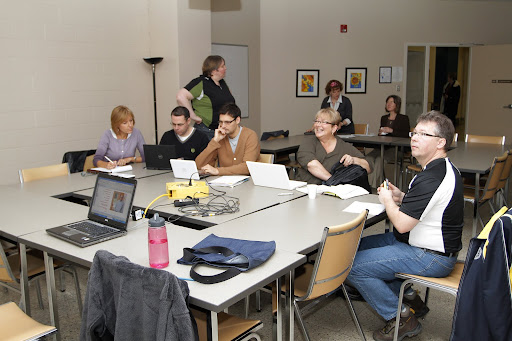 That's me on the left, Arlene Fedorchuk, trying to participate at one of the sessions. Note my trusty pen and paper technology because I can't log in to my computer.
As a technologically challenged learner, I often find learning about new technology overwhelming and energy draining for several reasons. First of all, the language of technology is a foreign language that I am slow in acquiring. Secondly, I struggle with the basics such as logging on or opening sites and I don't know why. Some days I swear leprechauns inhabit my computer and wreck havoc at will. Thirdly, I need to have time to process each step of the application, but because I struggle with technical issues, I'm always a step behind the presenter. I am a bit competitive (I like to think in a healthy way) and I lose focus as I struggle to learn and worry about falling behind. Fourthly, I see the potential in incorporating new technologies in my classroom - I actually get really excited about this - but because when I leave a session, life gets in the way and I don't revisit what I've learned, I'm often left with a sense of failure as a learner and as a teacher who missed an opportunity to offer EAL students alternative pathways to acquiring the English language.
That's me on the left, Arlene Fedorchuk, trying to participate at one of the sessions. Note my trusty pen and paper technology because I can't log in to my computer.As a technologically challenged learner, I often find learning about new technology overwhelming and energy draining for several reasons. First of all, the language of technology is a foreign language that I am slow in acquiring. Secondly, I struggle with the basics such as logging on or opening sites and I don't know why. Some days I swear leprechauns inhabit my computer and wreck havoc at will. Thirdly, I need to have time to process each step of the application, but because I struggle with technical issues, I'm always a step behind the presenter. I am a bit competitive (I like to think in a healthy way) and I lose focus as I struggle to learn and worry about falling behind. Fourthly, I see the potential in incorporating new technologies in my classroom - I actually get really excited about this - but because when I leave a session, life gets in the way and I don't revisit what I've learned, I'm often left with a sense of failure as a learner and as a teacher who missed an opportunity to offer EAL students alternative pathways to acquiring the English language.
Ironically, however, I was a presenter at yesterday's workshop too. Yes, me - Ms. Technophobe. I presented a session on my EAL students' use of Photostory to share their learning journey in my EAL classroom. I have to say I surprised myself by accepting the invitation to present, especially because I identify myself as illiterate in the area of technological literacy. I realize several factors were part of a process that led me to the place where I had enough confidence to share my learning with my colleagues, which were:
- stepping out of my comfort zone and taking a risk
- making the time (uninterrupted time) to spend using and experimenting with Photostory
- inviting our teacher-librarian to be on hand in my classroom to troubleshoot the technology as together we introduced it to my students and as the students shared their final presentations
- taking on the role as learner and learning with and from the students
- trying Photostory again and again with other classes and working out some of the kinks
As a participant at the Literacy in the 21st Century workshop, I came away with an array of feelings and lots to think about. I was amazed at the variety of new technologies shared, and I felt inspired to try some with my students. But I was also overwhelmed by the sheer number of technologies and could feel myself disengaging because of the overload.
Hmmmm . . .
I wonder how students feel about incorporating new technologies into their learning. I've heard the talk that young people are often more technologically savvy than adults. It's true that some EAL students are highly technologically literate and possess the latest technology. But, others arrive with low first language literacy, and have no experience in a school setting, let alone with computers. The common factor among this student group is that each student is an English language learner who needs to acquire both conversational and academic English in order to be successful in high school. As their EAL teacher, the technologies' ability to enhance students' English language acquistion will be what I keep in mind as I decide which new technology to incorporate into our learning environment.
Tuesday, March 16, 2010
No Longer "Preaching to the Choir"
My job changed just after Christmas from a full member of the Collegiate Renewal team, to one called Instructional Technology Analyst. While I enjoy both jobs, I somewhat miss the closer connection to instruction and working closely with teachers on strategies directly related to their instruction.
Now I do work with teachers, but I feel it is more at the adoption level. Many of the teachers I am speaking with now are teachers who are not necessarily pro-technology, and in fact, some see it as something that is taking away from learning. While people are generally very kind to me, I know that there are many who do not share my views of technology in education. While with Collegiate Renewal, I mostly felt like I was, “preaching to the choir.”
With my new position, I struggle to find ways to make people comfortable enough to try new things and be adventurous, and to see how technology is not just another thing to do, but another thing to help us do what we want to do. We need to define clear outcomes, then use the technology to help us reach those outcomes. So that rather than trying to keep the students from using technology (“it is so distracting”) we need to find ways of embracing the technology that is so engaging to the kids. As one of my colleagues commented today, “a pencil is a technology, but we don’t think about using it, we just use it to do the job we want to do.”
And while it is different work, I find it rewarding and challenging to have these conversations, just as I did when teaching students who weren’t necessarily, “buying what I was selling.” But when I can make them challenge their own thinking, then I have done my job.
Now I do work with teachers, but I feel it is more at the adoption level. Many of the teachers I am speaking with now are teachers who are not necessarily pro-technology, and in fact, some see it as something that is taking away from learning. While people are generally very kind to me, I know that there are many who do not share my views of technology in education. While with Collegiate Renewal, I mostly felt like I was, “preaching to the choir.”
With my new position, I struggle to find ways to make people comfortable enough to try new things and be adventurous, and to see how technology is not just another thing to do, but another thing to help us do what we want to do. We need to define clear outcomes, then use the technology to help us reach those outcomes. So that rather than trying to keep the students from using technology (“it is so distracting”) we need to find ways of embracing the technology that is so engaging to the kids. As one of my colleagues commented today, “a pencil is a technology, but we don’t think about using it, we just use it to do the job we want to do.”
And while it is different work, I find it rewarding and challenging to have these conversations, just as I did when teaching students who weren’t necessarily, “buying what I was selling.” But when I can make them challenge their own thinking, then I have done my job.
Integrating Courses
I went to watch Bill K to see that he did with his innovative grant for technology. Bill decided to teach a class called Robotics, which is taught as a computer science credit, although students are learning engineering, design and programming. Bill has taught computer science 20 for a number of years, and covers the essential content which adding vex materials. You can view Bill's prezi to get the basic idea of his presentation.
Bill's robots are like a combination of vex (think meccano) and a programmable brain. The brains have a programming module and a couple of processors, and can be programed in a variety of languages. As Bill talked about all the things that he could do with the robots and the students' problem-based learning, you could see why many students would be engaged in the process.
Bill's students get to take their robots beyond the classroom to Skills Canada. He said, "the student engagement level is much higher [than computer science]. They program it, then they see it in action."
In the 30 level, student will learn how to design and fabricate robots, adding electronics, welding, cutting, and other fabrication skills. Bill is excited about the fact that this class will integrate a series of skills for technically inclined students. As I watched the video of the students driving the robots they built in skills competitions for cheering crowds, I could see how an authentic audience really added to the student engagement.
Bill described how easy it is to retain students, who love the class. He describes himself as a co-learner or facilitator. He described a day when he was working with another teacher about what engagement looks like. Bill quickly opened his class, and his students were all in and working while he talked to the teacher. He realized anyone could look into the room and see engagement - busy students talking loudly, problem-solving and working with technology.
For the second half of the his session, Bill talked about how he has been conducting his assessment using wikis. Bill started by explaining the advantages to the site being open the public, and how he handled problems with inappropriate additions. He likes wikis because it is clear what each user contributes and students are accountable for their learning. You can view their wiki or their specific group work. Bill likes the fact that you can the history allows you to see what each person contributes. Because he uses negotiated assessment where students explain what they have learned and use evidence from the wiki to prove their contribution. He uses the comments for students to provide feedback for other students. Bill noted that students learn the most by commenting on each other's wikis.
Bill's robots are like a combination of vex (think meccano) and a programmable brain. The brains have a programming module and a couple of processors, and can be programed in a variety of languages. As Bill talked about all the things that he could do with the robots and the students' problem-based learning, you could see why many students would be engaged in the process.
Bill's students get to take their robots beyond the classroom to Skills Canada. He said, "the student engagement level is much higher [than computer science]. They program it, then they see it in action."
In the 30 level, student will learn how to design and fabricate robots, adding electronics, welding, cutting, and other fabrication skills. Bill is excited about the fact that this class will integrate a series of skills for technically inclined students. As I watched the video of the students driving the robots they built in skills competitions for cheering crowds, I could see how an authentic audience really added to the student engagement.
Bill described how easy it is to retain students, who love the class. He describes himself as a co-learner or facilitator. He described a day when he was working with another teacher about what engagement looks like. Bill quickly opened his class, and his students were all in and working while he talked to the teacher. He realized anyone could look into the room and see engagement - busy students talking loudly, problem-solving and working with technology.
For the second half of the his session, Bill talked about how he has been conducting his assessment using wikis. Bill started by explaining the advantages to the site being open the public, and how he handled problems with inappropriate additions. He likes wikis because it is clear what each user contributes and students are accountable for their learning. You can view their wiki or their specific group work. Bill likes the fact that you can the history allows you to see what each person contributes. Because he uses negotiated assessment where students explain what they have learned and use evidence from the wiki to prove their contribution. He uses the comments for students to provide feedback for other students. Bill noted that students learn the most by commenting on each other's wikis.
Subscribe to:
Posts (Atom)